


The main difference is how the connection handles unwanted electrical noise. A balanced connection helps keep hum and buzz out of the audio, especially along longer cables. An unbalanced connection can work well over a short distance between compatible devices.
XLR and TRS connectors are often used for balanced audio. Analog RCA connections are normally unbalanced. However, the plug is only a clue: the equipment and the way it is connected determine whether the connection is balanced.
This guide explains how to recognize the connectors, choose a suitable cable and avoid common mistakes. It covers ordinary analog audio connections between microphones, mixers and other equipment.
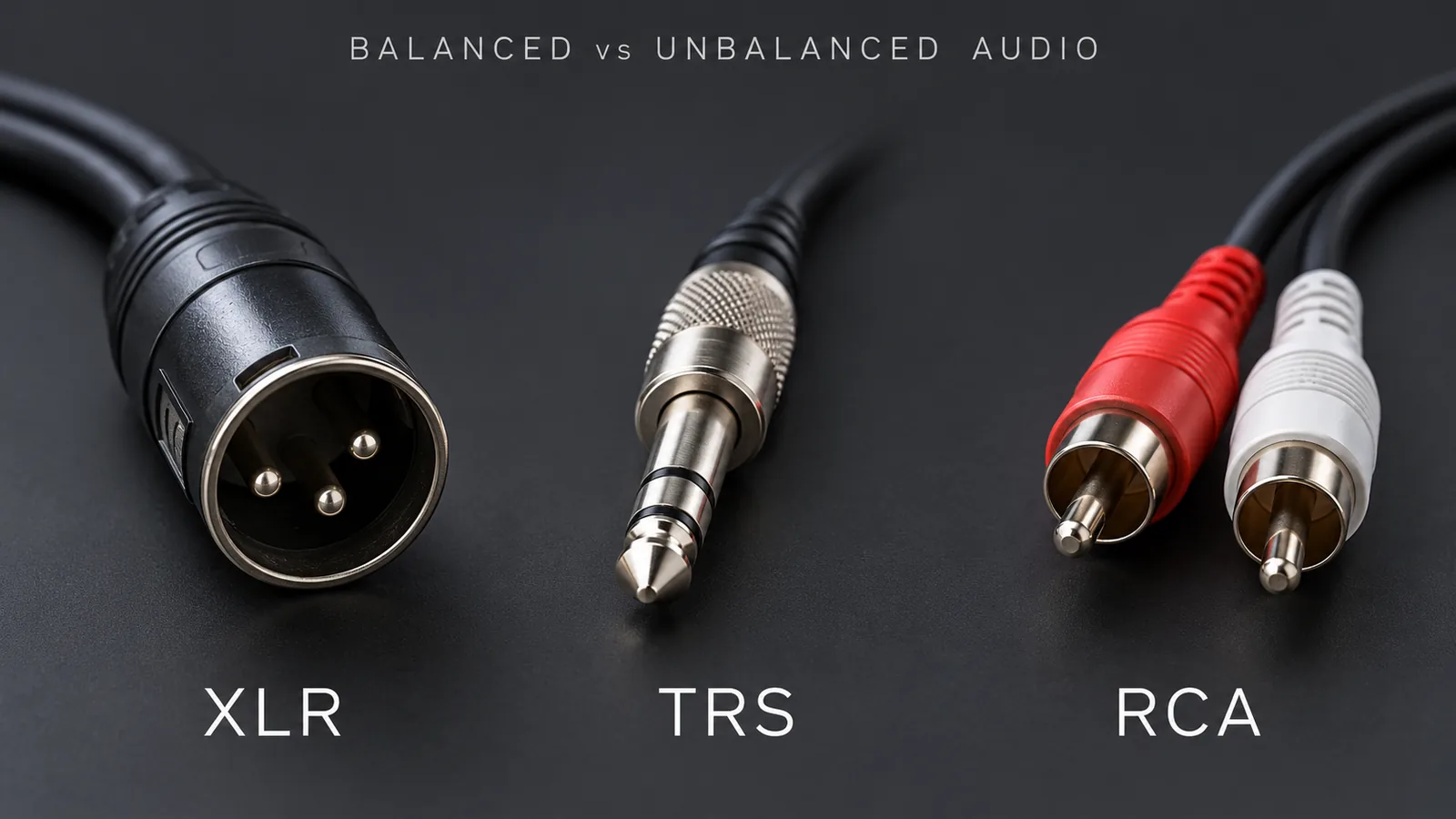
Balanced vs. unbalanced: the simple difference
An audio cable carries sound as an electrical signal. Along the way, it may pick up interference from nearby electrical equipment. You might hear that interference as hum or buzz.
A balanced connection gives the receiving device a way to reduce that interference. It uses two signal wires, usually with a separate shield around them. The input compares the two wires and reduces interference that appears in the same way on both.
A typical unbalanced cable uses one signal wire and a shared return and shield. It does not offer the same way of rejecting interference. This does not mean it always sounds noisy: a short, correctly connected RCA cable can work very well.
You do not need to know the circuit details to choose a cable. Start by finding out what the output and input support. Yamaha’s connection guide explains the basics.
| Question | Balanced | Unbalanced |
|---|---|---|
| Main benefit? | Better resistance to interference picked up along the connection | Practical for short connections between suitable devices |
| Common plugs? | XLR; TRS used for balanced audio | RCA; TS |
| Example use? | Microphone to mixer, or mixer to powered speaker | Nearby playback device to mixer |
| Which should I choose? | Useful when supported by the equipment and needed for the setup | May already meet your needs for a short connection |
How to recognize XLR, TRS and RCA
XLR: the common three-pin microphone connector
The usual analog audio XLR connector has three pins or three matching holes. You will often see it on microphones, mixers and wireless microphone receivers.
For example, a wired microphone may connect to a mixer’s microphone input with an XLR cable. A mixer may also use XLR to send audio to a powered speaker—a speaker with its own amplifier.
XLR does not always mean “microphone input.” Some XLR connections carry a stronger signal called line level. Check the socket label and manual before connecting. If you need the pin details, Neutrik’s XLR FAQ provides the standard wiring information.
TRS: look for two insulating rings
A TRS plug has three metal contact sections separated by two insulating rings, often black. TRS stands for tip, ring and sleeve, the names of those sections. The larger 6.35 mm version is common on audio equipment; smaller versions are also used on headphones.
The part that often confuses beginners is this: TRS does not always mean balanced audio.
- A balanced line connection uses TRS for one audio channel. One channel is called mono.
- A conventional headphone connection uses TRS for left and right audio. Two channels are called stereo.
- A mixer socket marked INSERT may use TRS to send audio to an effects device and bring it back. Use the connection specified in the mixer manual.
The plug shape is the same, but the jobs are different. A headphone output should not be treated as a balanced mono output. Focusrite’s hardware guide shows balanced line outputs and a separate stereo headphone output on one device.
You may also see a TS plug. It normally has just one insulating ring and is often used for an unbalanced guitar connection. Count the rings, then check what the socket accepts.
RCA: the familiar red-and-white pair
An RCA plug has a center pin surrounded by an outer metal contact. For analog audio, red and white plugs usually carry right and left audio separately. One RCA plug carries one channel.
You may find RCA on playback devices, karaoke equipment or mixer inputs. These analog audio connections are normally unbalanced.
RCA is also used for other signals, so check the label. An RCA socket marked for video or digital audio is not the same as an ordinary analog audio input.
Which cable should you choose?
Read the output label on the first device and the input label on the second. Then choose the cable recommended for that connection. Use this table as a starting point:
| What you want to connect | A common choice | Check first |
|---|---|---|
| Wired microphone → mixer | XLR microphone cable | Use the mixer’s compatible microphone input |
| Balanced TRS output → balanced TRS input | TRS-to-TRS cable | Both sockets must support balanced audio |
| Balanced XLR output → balanced TRS input | XLR-to-TRS cable | Wiring and signal strength must suit both devices |
| Analog RCA output → RCA input | RCA cable; a pair for stereo | Use audio sockets and connect left/right correctly |
| Wireless microphone receiver → mixer | Cable specified by both equipment manuals | Confirm the receiver’s output type and mic/line setting |
Match the signal strength as well as the plug
Mic level means the weak signal normally produced by a microphone. Line level is a stronger signal commonly sent between audio devices.
A line-level output can be too strong for a microphone input and cause distorted sound. A microphone signal can be too weak for a line input and sound very quiet. Some devices let you switch between mic and line settings; others do not. Shure’s mic and line level guide explains why this matters.
For a complete setup example, see how to connect a wireless microphone to a mixer and effects processor. Once the connections are correct, our mixer gain vs. fader guide explains how to adjust the levels.
Does balanced audio sound better?
Balanced audio can help you hear less interference. It does not automatically make the music or voice itself better. If a short unbalanced connection already sounds clean, changing the connector may not produce a noticeable improvement.
For a microphone cable across a stage, or a mixer feeding equipment farther away, a suitable balanced connection is often useful. Shure’s microphone guide explains why balanced microphone connections suit longer cables.
There is no single cable length that works for every setup. Keep unbalanced runs short where practical, follow the equipment guidance and test the length you intend to use.
Can an adapter turn RCA into balanced XLR?
A simple adapter changes which plug fits. It does not automatically turn an unbalanced output into a balanced one.
An RCA-to-XLR cable may work for a connection approved by the equipment manufacturer. It does not guarantee that hum or buzz will disappear. Jensen’s connection guide covers ways to connect balanced and unbalanced equipment.
For a longer connection, you may need a separate interface that converts the signal, or an isolator that helps address a grounding problem. A DI box is one type of interface, often used to connect an instrument to a mixer’s microphone input. Choose it for the devices involved: some DI boxes reduce the signal to mic level, so they are not a universal solution for line-level connections. Radial explains this difference.
What to check if you hear hum or buzz
- Check the sockets. Make sure you connected an output to a suitable input, and confirm mic/line settings.
- Try a known-good cable. A damaged cable or loose plug can cause problems.
- Check the cable route. Keep audio cables away from power supplies and lighting equipment where practical.
- Test a shorter connection. This can help you find out whether the cable run is contributing to the problem.
- Check each connection in turn. If the problem remains, follow the manuals or ask for help choosing a suitable interface.
Balanced connections do not remove every kind of noise. They cannot fix distortion caused by a signal that is too strong, or noise already coming from the source device. Never remove protective mains earth to try to stop hum. Rane’s interconnection guide explains grounding and mixed-connection issues.
Three questions to ask before buying audio equipment
If you are choosing a mixer or wireless microphone system, send the supplier the models you plan to connect and ask:
- Which output and input should I use?
- Which cable or adapter do I need, and is this connection balanced?
- Will it work over my planned cable length?
For business purchases, test a sample with the intended equipment before placing a bulk order. Include your application, destination country and expected quantity when requesting a quotation.
Send your setup details to EP AudioSource. EP is an independently operated B2B sourcing and coordination service based in Enping, China. We can help clarify equipment requirements and coordinate questions, quotations and samples with suitable manufacturers. Product specifications and commercial terms are subject to the selected supplier’s quotation and contract.